One of the conversations that comes up most often when kicking off an ECM project on Microsoft 365 is the one about licensing. And it almost always comes up late: once the design is already done and someone asks, “but is that included in what we have?” What looks like an administrative detail ends up being an architecture decision. The license the client holds defines what you can build and how.
In my experience, this happens in every kind of organization: banks, insurers, clinics, public agencies, services companies. The scenario changes, but the confusion over Microsoft 365 licensing is always the same. In this article I’ll lay out the complete picture for you so you walk into the design meeting with the numbers clear.
Why does the license define the architecture?
In an ECM project on Microsoft 365 the license isn’t just a cost question: it’s a feature enabler. If the client doesn’t have Microsoft Purview Records Management, they can’t implement granular retention by content type. If they don’t have SharePoint Embedded, they can’t use containers as a first archiving layer. Defining the license stack first avoids designing an architecture that can’t be implemented later.
Microsoft organizes its ECM licensing into three categories: the base plans that enable the platform, the add-ons that bring specific capabilities, and the pay-as-you-go services that scale without needing additional per-user licenses.
The Enterprise plans: E3, E5 and the new E7
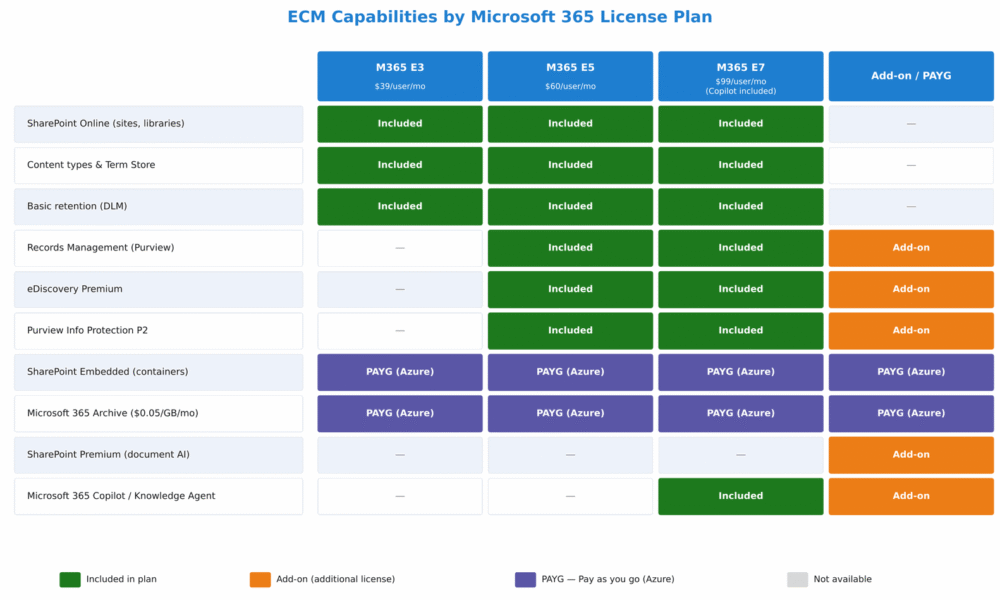
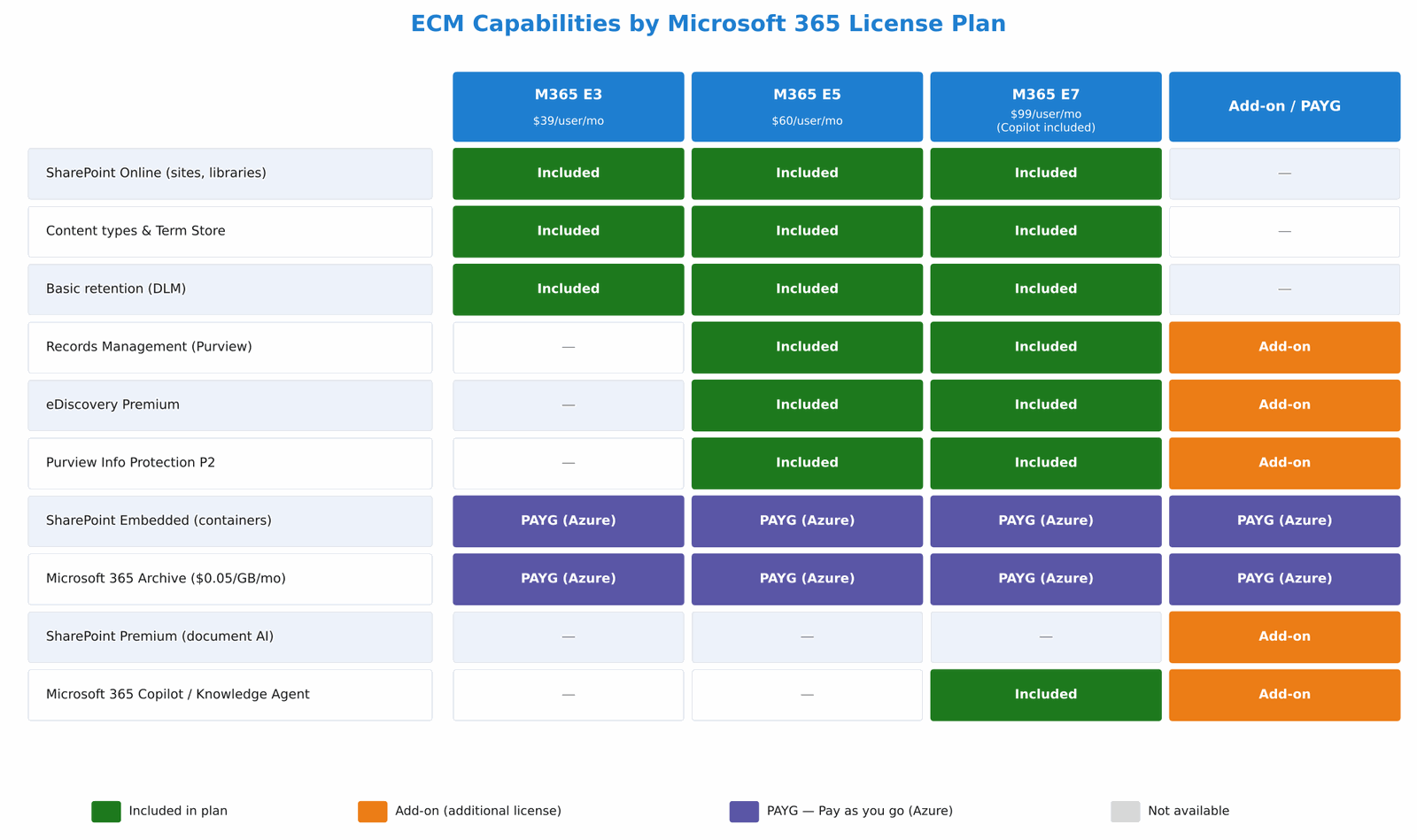
The three enterprise plans relevant to ECM in 2026 are M365 E3 ($39/user/month), M365 E5 ($60/user/month) and the recent M365 E7 ($99/user/month, available since May 2026). These plans have no user limit and are the starting point for large organizations or those with advanced compliance requirements.
The E3 plan includes the full SharePoint Online: sites, libraries, content types, Term Store, managed metadata and basic retention. For a document management system without advanced compliance requirements, E3 is the base plan.
The E5 plan adds the complete Purview Compliance stack: Records Management, eDiscovery Premium, Insider Risk Management, Communication Compliance and Purview Information Protection P2. For organizations with demanding regulatory compliance—financial, healthcare, government—E5 is the real starting point.
The E7 plan (May 2026) includes everything in E5 plus Microsoft 365 Copilot in the base package. For those already paying for E5 + the Copilot add-on, E7 can represent a similar cost with a simpler bill.
Image 1 summarizes which ECM capabilities each Enterprise plan includes and which require an additional add-on.
Does everyone need E3 or E5? Mixed licensing for contributors
Not every user of a document management system does the same thing. The compliance officer who configures the Purview policies needs E5; the document operator who loads files can work with E3 or Business Standard; the branch manager who only consults documents can use Business Basic. Different plans can coexist in the same tenant without any problem.
Microsoft organizes the lower-cost options into two additional families:
Business plans (up to 300 users per organization): include SharePoint Online, Teams and Exchange with different levels of Office apps.
- Business Basic ($7/user/month): SharePoint Online via web and mobile, Teams and Exchange. No desktop apps. Enough for users who only collaborate on documents from the browser.
- Business Standard ($14/user/month): everything above plus the Office desktop apps.
- Business Premium ($22/user/month): adds Intune, Defender for Business and Purview Information Protection P1. Suitable for midsize organizations with basic compliance needs.
Frontline Worker licenses (F1/F3): designed for field workers or occasional lookup users in Enterprise and Business tenants.
- F1: read-only access to SharePoint Online via web and mobile. Ideal for users who only need to consult documents.
- F3 ($10/user/month since July 2026): full edit access to SharePoint and Teams. For field users who also need to upload documents.
A key clarification for ECM projects: Purview retention policies and sensitivity labels act on the content, not on the license of the user accessing it. A Business Basic user who uploads a document to a library protected by a Purview policy still falls under that policy. What does require an E5 license or the Purview Add-on is the administration of those policies: those who configure them, apply regulatory labels or take part in disposition reviews need the appropriate license.
It’s also worth mentioning that since May 2026, Microsoft retired the SharePoint Online Plan 1 and Plan 2 plans as standalone products. Access to SharePoint is now licensed solely through the Microsoft 365 plans (Business, Enterprise or Frontline).
The following table summarizes the criteria for choosing the license level by user profile in an ECM project:
| User profile | Role in the ECM system | Recommended license |
|---|---|---|
| Compliance administrator / Records Manager | Configures Purview policies, Records Management, disposition | M365 E5 or E3 + Purview Add-on |
| Architect / SharePoint admin | Designs and administers the site architecture and content types | M365 E3 or E5 |
| Document operator | Loads, classifies and manages files daily | M365 E3 or Business Standard |
| Occasional contributor | Edits and consults documents, takes part in approval flows | M365 E3, Business Basic or Business Standard |
| Lookup user | Only consults documents from the browser or mobile | M365 Business Basic or F1 |
| Field user with edit rights | Uploads documents from the field via mobile app | M365 F3 |
SharePoint Premium: when AI classifies on its own
SharePoint Premium—the product formerly called Syntex—is an add-on of roughly $5/user/month that brings automatic document classification and AI applied to content. With SharePoint Premium you can train models to classify documents automatically and extract metadata without user intervention: the system recognizes a contract, assigns it its content type and fills in the metadata fields right at the moment of upload.
For the ECM architecture we’re building in this series this is especially relevant at the point of ingestion: the operator uploads the document, SharePoint Premium classifies it and assigns the correct content type without the operator having to pick it by hand. It isn’t a mandatory add-on to get started, but it makes a significant difference in the experience of document operators.
SharePoint Embedded: no user licenses, pay as you go
SharePoint Embedded is Microsoft’s container service, billed 100% by consumption through an Azure subscription, with no per-user licenses. It has four billing meters:
- Active storage: per GB stored in active containers
- Archived storage: a lower rate for containers in an archived state
- API transactions: per Microsoft Graph call from the application
- Egress: per GB of data leaving the platform (with exemptions for Office Desktop clients and for the WAC)
The exact per-GB pricing model is published on the product’s official page: https://adoption.microsoft.com/en-us/sharepoint/embedded/. The important thing from an architecture standpoint is that SharePoint Embedded doesn’t require end users to hold additional licenses: the cost is paid by the organization for what it consumes, which makes it ideal for long-term archiving where access is sporadic.
Microsoft 365 Archive: cold storage at the best cost
Microsoft 365 Archive charges $0.05/GB/month for the storage of archived sites and files—but only when that storage exceeds the quota included in the tenant’s licenses. If the tenant has unused quota available, archiving generates no additional cost.
Something many projects don’t take into account: since March 31, 2025, reactivating archived content is free. There’s no longer a charge for reactivating a site or file. What does apply is a 120-day period during which newly reactivated content can’t be archived again. For document lifecycle design, this detail matters.
Microsoft Purview: the retention and records engine
To implement retention by content type and full Records Management, the minimum functionality required is Microsoft Purview Data Lifecycle Management and Records Management. Both are included in M365 E5. For users on E3, you can add the Microsoft Purview Suite add-on, which brings the complete advanced compliance stack without having to migrate to the full E5 plan, although in most ECM projects of a certain scale it ends up being more convenient to go straight to E5.
Microsoft 365 Copilot: the Knowledge Agent license
The SharePoint Knowledge Agent—the natural-language search layer we mentioned in the ECM Architecture article—requires Microsoft 365 Copilot. In the enterprise market the add-on costs $30/user/month on top of E3 or E5. As an alternative, the new M365 E7 plan includes it in the package.
Not every user of the document management system needs Copilot. In general it’s licensed only for the profiles that are going to make natural-language queries or use AI capabilities over the content. Document operators who only load and consult files can work perfectly well with E3 without Copilot.
What does the ECM Architecture scenario need?
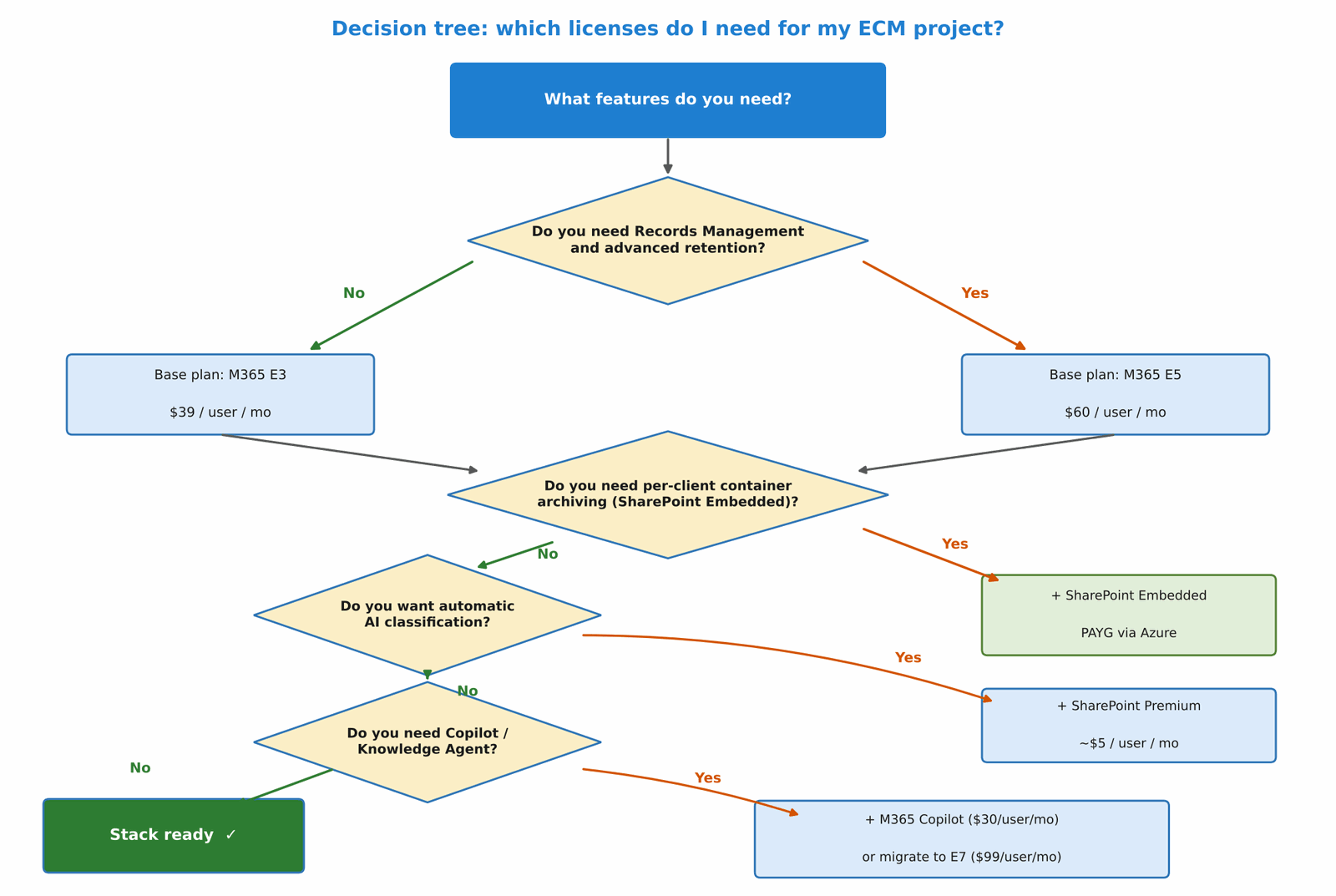
For the document management system we’re building in this series—using the financial sector as a reference for its regulatory complexity, though the same stack applies to any organization with similar needs—the minimum recommended combination would be the following:
- M365 E5 for administrators, compliance officers and users with Records Management roles.
- M365 E3 or Business Standard for document operators who load and manage files.
- Business Basic or F1 for lookup users who only need to view documents.
- SharePoint Embedded via Azure (PAYG) for the archiving containers per entity or client.
- Microsoft 365 Archive (PAYG, $0.05/GB/month) when the tenant exceeds its storage quota.
- SharePoint Premium (optional, ~$5/user/month) for operators who are going to take advantage of automatic classification at ingestion.
- Microsoft 365 Copilot (optional, +$30/user/month) for profiles who are going to query the system with natural language.
Image 2 shows the decision tree for choosing the stack according to each project’s needs.
Conclusion
In this article I’ve presented the complete map of licenses involved in an ECM project on Microsoft 365. The key is to think in layers: E5 for those who administer compliance, E3 or Business for document operators, and F1 or Business Basic for lookup users. On top of that mix, SharePoint Embedded and Microsoft 365 Archive enable two-tier archiving without additional per-user licenses; and Copilot opens the door to the Knowledge Agent for natural-language search. In the next article we start with the document structure: the site hierarchy, the content types and the role of hub sites in the ECM platform.
Fabián Imaz
Office Apps and Services MVP
CEO Siderys | CTO qualitaslearning.com
fabiani@siderys.com.uy | @fabianimaz