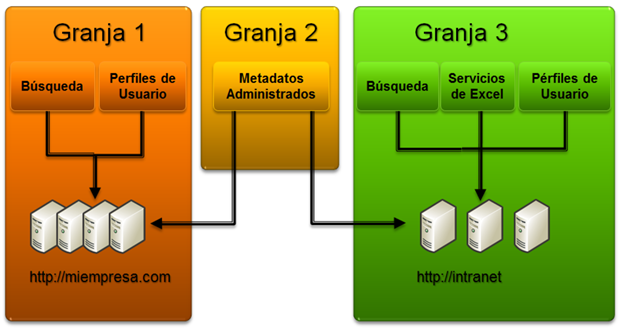
The SharePoint Server Services architecture is one of the most robust and scalable features of the platform since it allows you to activate services on different servers on the farm and even be able to have the same service activated within different servers. When planning a SharePoint Server farm, we must consider how it will be used and what features end users need. Over the past few years I have encountered SharePoint deployments where basic considerations have not even been taken into account, services running on wrong servers, databases with little or no optimization, and many other bad configurations that end up affecting the Overall performance of SharePoint and thus making end users have a bad experience with the platform. Services must be planned one by one, it should not be forgotten that each service consumes a set of resources within each server where it is activated and even some of the services could be redundant to ensure the availability of the same.
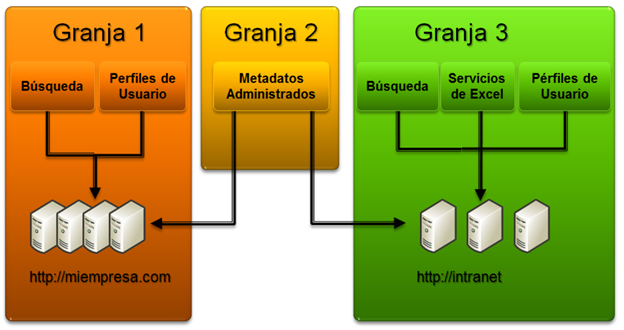
ScreenShoot 1 – Farm Services Architecture SharePoint Server
Together with 2 friends, Gustavo Velez and Juan Carlos Gonzalez wrote a series of articles on MSDN about the services of SharePoint Server, then I leave the links to them
Today we have the new version, SharePoint Server 2016 and as such, the services architecture remains one of the pillars of the platform. But you must also keep in mind that the architecture that SharePoint provides is extensible and you can create custom services that are hosted in a SharePoint farm to provide different functionality to end users. In the following link, SharePoint Custom Service, you can download the source code of a custom service that exposes an operations serié against a database. The service was created for SharePoint Server 2013, but it works perfectly for SharePoint Server 2016.